Design courses with AI. Publish to any LMS.
Build a course with AI in the browser, hit publish, and share a single access code. Any instructor on Canvas, Moodle, or any LTI 1.3 LMS redeems it — with live updates and grades to their gradebook.
Start with just an email — no LMS of your own required.
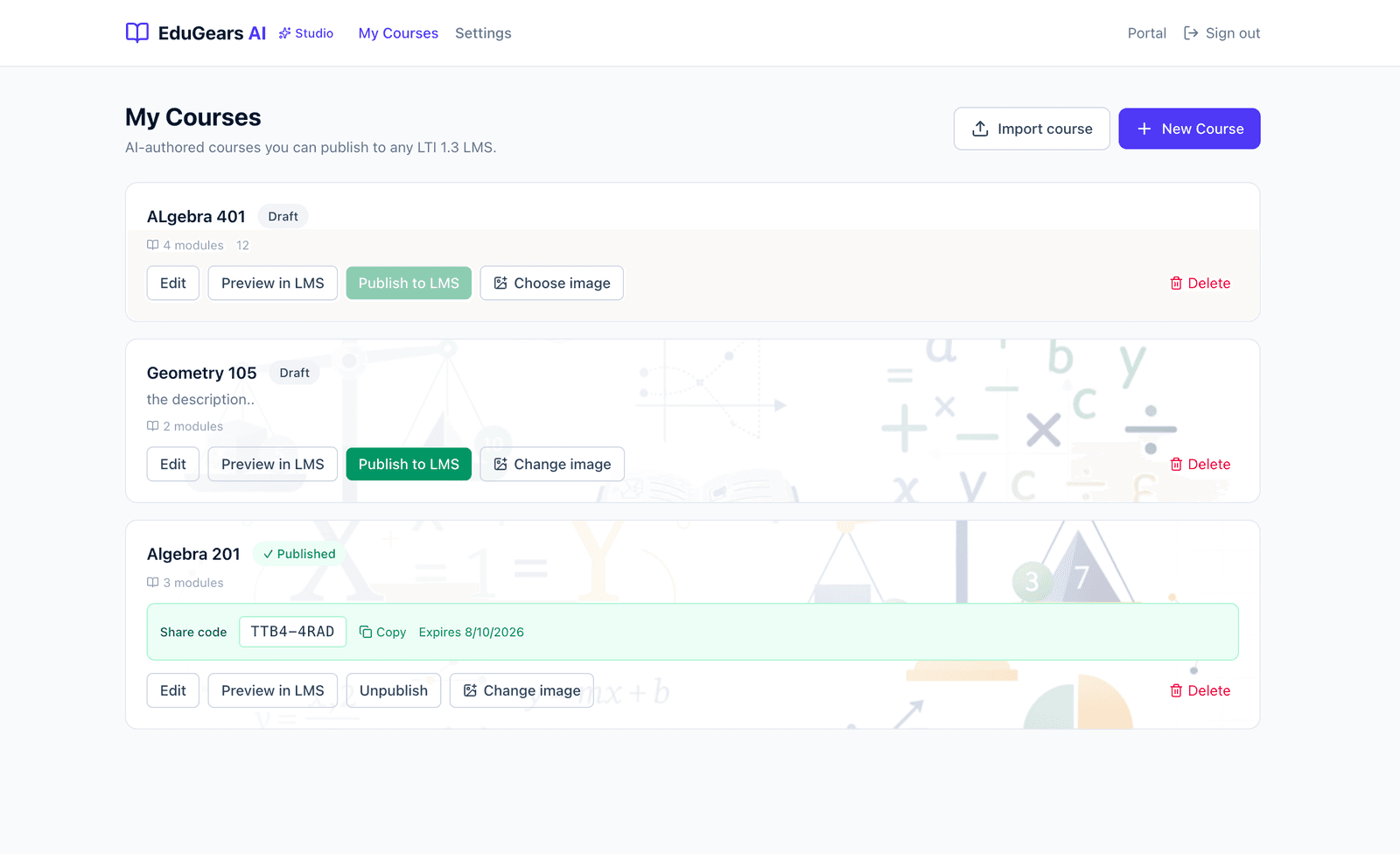
From your studio to any classroom in three steps
One access code carries your live course into every LMS that redeems it.
Author or import your course
Build a course with AI in the browser, or import an existing Common Cartridge (Canvas), Moodle, or SCORM package and refine it. No LMS required to start — just an email.
Publish or export
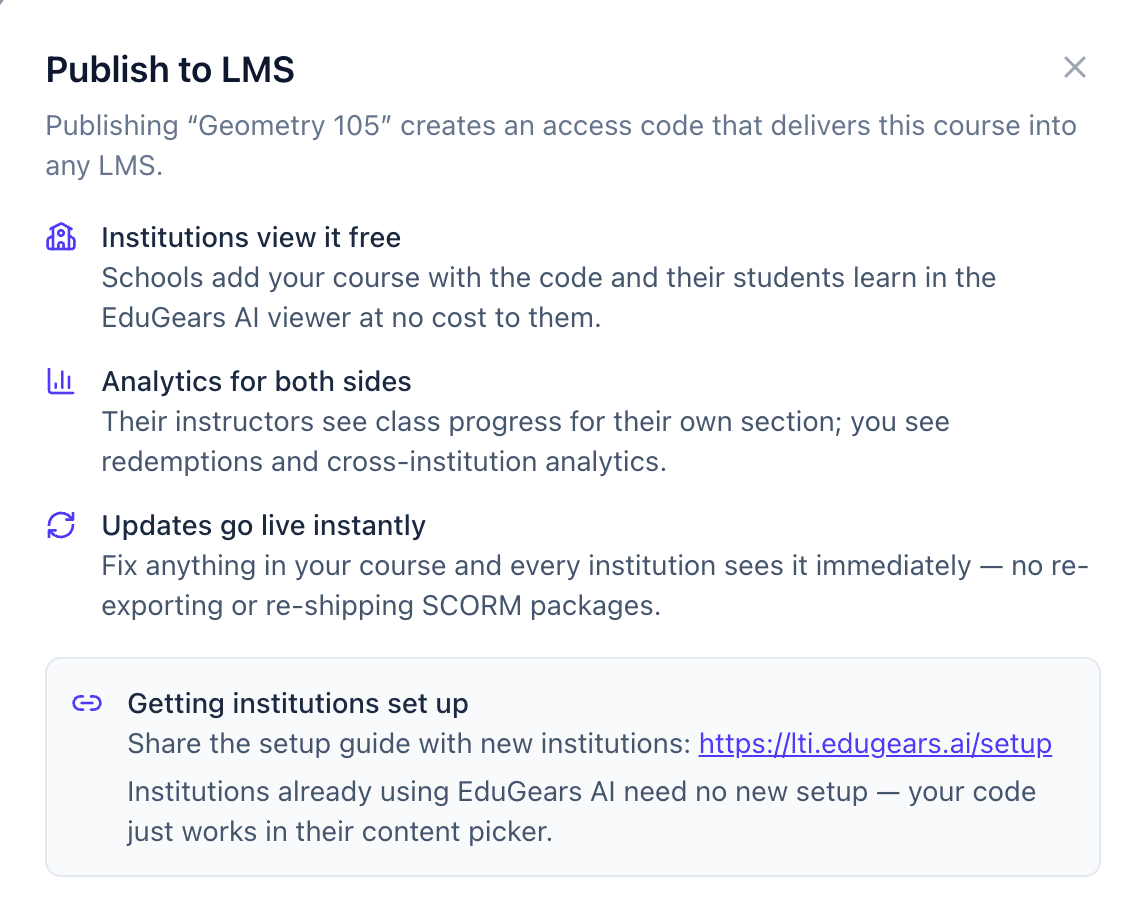
Publish to get a short access code (like XXXX-XXXX) that delivers your live course into any LTI 1.3 LMS. Or export the whole course as a file — SCORM, Moodle .mbz, or Common Cartridge (Canvas) — and take it anywhere.
Instructors redeem it in their LMS
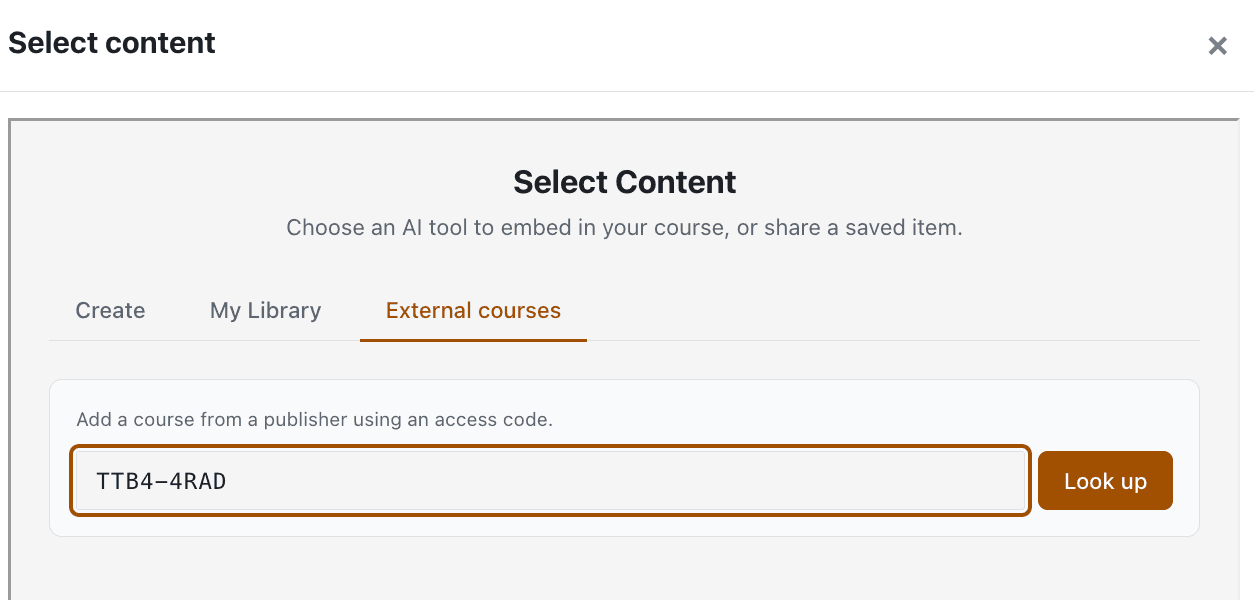
Any instructor on any LTI 1.3 LMS — Canvas, Moodle, and more — pastes the code into EduGears AI and the live course appears in their course, grades wired to their gradebook.
Everything you need to build and ship a course
Author with AI, bring your existing content in, take it out whenever you want, and design how the course actually teaches.
Authoring
Build a real course with AI — in the browser
Start from a syllabus, a pile of files, or a blank page. The AI course builder turns your material into structured modules and lessons you can edit down to the sentence.
Syllabus & files → full course
Drop in a syllabus or source files and generate modules and lessons automatically, then refine each one by hand.
Every asset type, generated
Slides, study guides, worksheets, pages, quizzes, and question banks — created for you and fully editable. Every slide can carry an image — pasted from a URL, picked from your Library, or generated with AI — in preset positions and sizes, with a live preview. The PowerPoint (PPTX) download embeds the images in the file itself — real PowerPoint, fully editable — and SCORM, Common Cartridge and Moodle-backup exports carry them too; a slide whose image can't be fetched downloads as text-only rather than failing the file. Rubrics arrive as drafts you edit and own.
AI Enhance & media
Tighten any piece of content with AI Enhance, attach media, and generate images with AI so a course looks finished. A lesson's Media activity plays Canva designs inline, the way it plays YouTube and Vimeo — share the design so anyone with the link can view it.
Illustrate a whole deck
New decks come with a one-line image suggestion for each slide. “Illustrate all” makes an image for every slide that has one and no image yet — it tells you how many AI credits it will use and asks before it starts. Study guides and pages get Illustrate too: one or two AI images where they help, reviewed before you save.
Every AI image, checked
Each AI image is checked for accuracy before it lands — garbled text, wrong counts, a diagram that doesn't hold up. A slide that fails keeps its suggestion and gets no image. Your courses travel under your name; an honest blank beats a wrong picture.
Cog, the workspace assistant
Cog helps you author grounded in the materials you attach — and now answers product questions from EduGears AI's own manual, citing its sources so you can check the original. Ask it how a course is doing across schools, too: it answers from your own analytics, read-only, linking the page each number came from.
Publish when it's actually ready
The Publish button tells you exactly what's holding a course back, module by module — “Still generating…” or “No content yet” — and a hidden module never blocks publishing. When everything's ready, it says so and you publish.
Start from a description — or five docs
Generate modules from a description alone, with files now optional — a syllabus, a topic list, notes. Begin a course with up to five reference documents, and back-to-back lesson generations queue instead of blocking each other.
Content that knows its audience
Lesson plans generated in a module carry its target audience and learning level — read as prior knowledge, not an invented grade — and ordinary prose is no longer auto-linked, so “B.Tech” stays a degree.
Import & export
Bring content in. Take it out. No lock-in.
Import what you already have, and export a full course package whenever you want. Your content stays yours.
Import Common Cartridge, Moodle & SCORM
Turn a Common Cartridge / IMSCC package (what Canvas exports), a Moodle .mbz backup, or a SCORM 1.2/2004 package into an editable EduGears AI course.
Export CC, SCORM & Moodle
Export to Common Cartridge 1.3, SCORM 1.2/2004, or Moodle .mbz. Moodle exports carry real, gradable quiz activities; SCORM quizzes report scores back to the LMS.
Own your content
Nothing is trapped in the platform. Export a full package at any time and take it anywhere.
Learning design
Design how the course actually teaches
Go beyond a content dump. Sequence the experience, gate progress on mastery, and build in reflection.
Sequential Course Player
Learners move through a guided player instead of a flat file list, one step at a time.
Quiz gates & diagnostics
Set pass thresholds that gate progress and add diagnostic pre-checks that meet learners where they are.
Capstones & reflections
Capstone projects are AI-draft graded for instructor approval, and reflections get thoughtful AI acknowledgements.
AI Tutor for students
Your published course carries an AI Tutor grounded in your materials — guided Q&A and hints that never give away the answer. By default it answers from the course's own materials and politely declines questions outside them, and instructors at each institution can set its grounding strictness and guidance style per course.
A lesson outline that stays on screen
On a wide screen the module player docks the lesson list beside the content — ticks, the current lesson highlighted, collapsible and remembered — while phones and LMS frames keep the slide-out drawer. You see it yourself in Preview.
A question navigator built in
Quizzes you author give learners a “12/20” pill that opens a numbered grid of answered, unanswered and flagged questions, plus Flag for review, retakes that can build on the last attempt, and multiple-choice options shuffled so the answer isn't always (A).
Analytics for both sides — with a privacy line down the middle
You see adoption across institutions. Each institution sees only its own class. Neither side sees the other's data, and that boundary is a feature.
See adoption everywhere
Understand reach and engagement across every institution at once.
- Cross-institution analytics across every LMS that redeemed your code
- Cohorts labeled per institution, with learner tables
- A redemptions report — see exactly which institutions use each course
See only their class
A clean, private view scoped to the section they teach.
- Class Progress for their own section only
- Their roster stays private to them
- Grades flow to their LMS gradebook at completion
New
Cog is now an agent — ask it about your published courses
Ask in plain words: “How is my Circuits course doing across schools?” Cog opens your own Studio analytics, answers with the real numbers, and links the page they came from.
What is an AI agent?- Reads your own Studio analytics
- Your catalog only — never a school's private data
- Read-only — it never changes anything
Live updates
Fix it once. It's live everywhere.
Because institutions pull your course by code instead of importing a file, an update reaches all of them the moment you republish. No re-export cycle, no re-shipping, no version drift.
The SCORM way
- Re-export a SCORM package for every change
- Re-send files to each institution
- Chase down admins to re-upload
- Versions drift out of sync across LMSes
The Studio way
- Edit the course and republish
- Every institution is on the new version instantly
- Nothing to re-export, nothing to re-ship
- One source of truth for the access code
Prefer a file? You can still export to Common Cartridge, SCORM, or Moodle .mbz any time — your content is never locked in.
Who it's for
If you build courses that other people teach, EduGears AI Studio is your distribution layer.
Content publishers & course creators
Sell or license a course to many institutions from one place. Publish once, hand out access codes, and watch adoption across every LMS that redeems them.
Curriculum teams & districts
Standardize a course across schools without emailing SCORM packages around. Update centrally and every classroom is on the current version the same day.
Training providers & L&D
Deliver the same program into clients' existing LMSes over LTI 1.3, with completion grades flowing to their gradebooks and a redemptions report showing who's using it.
Instructional designers & solo creators
Design the full learning experience — sequencing, quiz gates, capstones, reflections — in the browser, with no LMS of your own required to get started.
Frequently asked questions
How access codes, delivery, analytics, and ownership work.
It's an AI course studio where you design (or import) a course, then get it into any LMS two ways: publish it as an access code any instructor on an LTI 1.3 LMS can redeem, or export it as a SCORM, Moodle .mbz, or Common Cartridge (Canvas) package. Author once, then deliver it live or hand off a standard file.
Any LMS that supports LTI 1.3 — including Canvas and Moodle. An instructor redeems your access code inside EduGears AI, and your course is delivered directly into their LMS.
Just EduGears AI, connected to their LMS once over LTI 1.3. Institutions already using EduGears AI need no new setup; others follow a one-time setup guide. Either way, delivering your course costs the institution nothing — with no per-student limit.
Institution setup guideNo — codes never expire by default. You can set an optional calendar expiry when you want one, and you can regenerate a code instantly at any time.
When a course isn't ready, the Publish button tells you exactly what's holding it back — module by module, with “Still generating…” or “No content yet”. Fix the list, or hide a module from learners to take it out of the check entirely. When everything's ready, the dialog says so and you publish — no guessing.
Unpublishing unlists it, so no new institutions can redeem the code. Institutions that already redeemed keep their access and students are never cut off mid-course.
Edit and republish. Every institution that redeemed the code is on the new version instantly — no re-export and no re-shipping files. Fix it once and it's live everywhere.
Yes. On a wide screen the player docks a lesson outline beside the content — each lesson ticked, circled, or locked, the current one highlighted, and the whole list collapsible and remembered per course. On phones and inside an LMS frame it stays a slide-out drawer. You see exactly what your learners get in Preview.
At course completion, grades flow back to each institution's own LMS gradebook over LTI Assignment & Grade Services (AGS).
You see cross-institution analytics — cohorts labeled per LMS, learner tables, and a redemptions report of which institutions use each course. Each instructor sees Class Progress for their own section only. The privacy boundary is deliberate.
Yes. Export any course to Common Cartridge 1.3, SCORM 1.2/2004, or Moodle .mbz — Moodle exports include real, gradable quiz activities. Your content is never locked in.
No. Sign up with an email and author entirely in the browser. An LMS only comes into play when an institution redeems your code to deliver the course.
Your first course is free — build it and publish or export it, no card required, with 100 one-time AI credits to try everything, or your own AI keys. For as many courses as you need, the Author Seat is $1.67 per author per month, billed annually ($19.99 per year) — one seat for each author, and you can add seats anytime. Every AI task draws AI credits: each seat comes with 100 one-time credits, then AI credit packs or your own AI keys. See the Pricing page for the full breakdown.
Build a course today. Publish it to any LMS.
Start free in the browser — just your work or school email to begin. Your first course is free, and institutions never pay to deliver your course.