Course Analytics
See how your course is doing everywhere it's taught
One access code takes your course into many LMSes. Course Analytics shows you, as the course owner, which institutions run it, how each cohort is doing and where learners drop off.
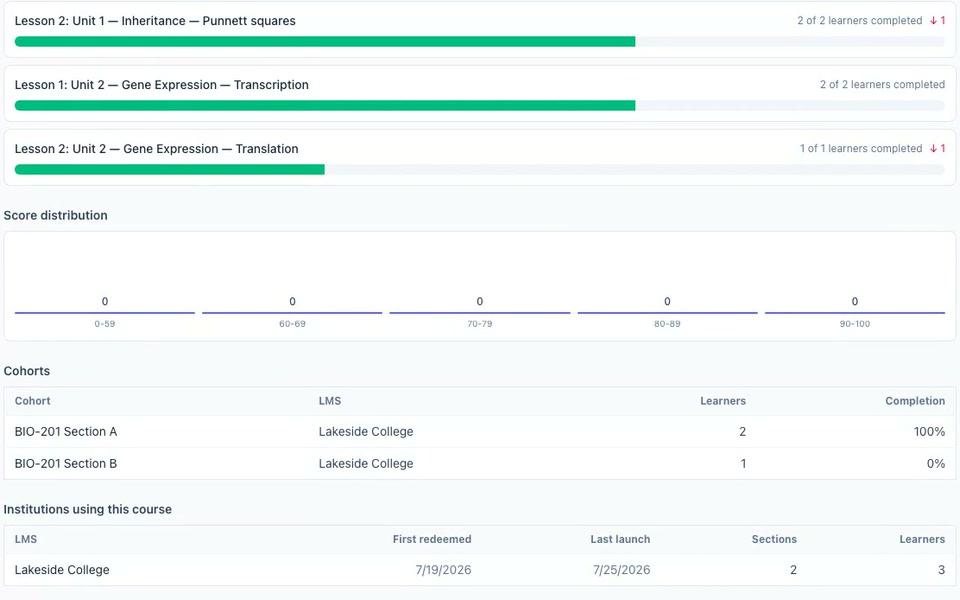
1 · Once schools redeem your code
Which institutions are running your course?
Each time an instructor redeems your access code, their institution appears in your Course Analytics. You see where your course lives, and whether it's still in use.
- The institutions table: each LMS, when it first redeemed your code, its last launch, sections and learners
- Cohorts: every LMS section your course runs in, with its learners and completion %
- Headline numbers: unique learners, completion rate, average quiz score and last active
Institutions using this course
Example| LMS | First redeemed | Last launch | Learners |
|---|---|---|---|
| Lakeside College | 7/19/2026 | 7/25/2026 | 3 |
| Riverside Community College | 8/4/2026 | 9/14/2026 | 12 |
2 · While they learn
How is each learner doing?
The learner table shows how far each cohort has got through your course. When you need it somewhere else, the Course Learners report filters it, charts it and exports it.
- Learner table: cohort, progress % and last active
- Course Learners report: filters, a chart and CSV export
- Print or save Course Analytics as a PDF
Cohort progress
ExampleBIO-201 Section A — Lakeside College
CSV2 learnersBIO-201 Section B — Lakeside College
CSV1 learnerSection 1 — Riverside Community College
CSV12 learners
3 · After each lesson and quiz
Where do learners drop off?
A lesson funnel for each module shows how many learners open each lesson and how many finish it. When one lesson loses people, you know where to look. Fix it once, and every institution running the course gets the update.
- Lesson funnel per module: views, completions and drop-off
- Score histogram: in-lesson quiz scores in five bands, beside the average
Lesson funnel
Score bands
4 · At each institution
Each instructor sees only their own section
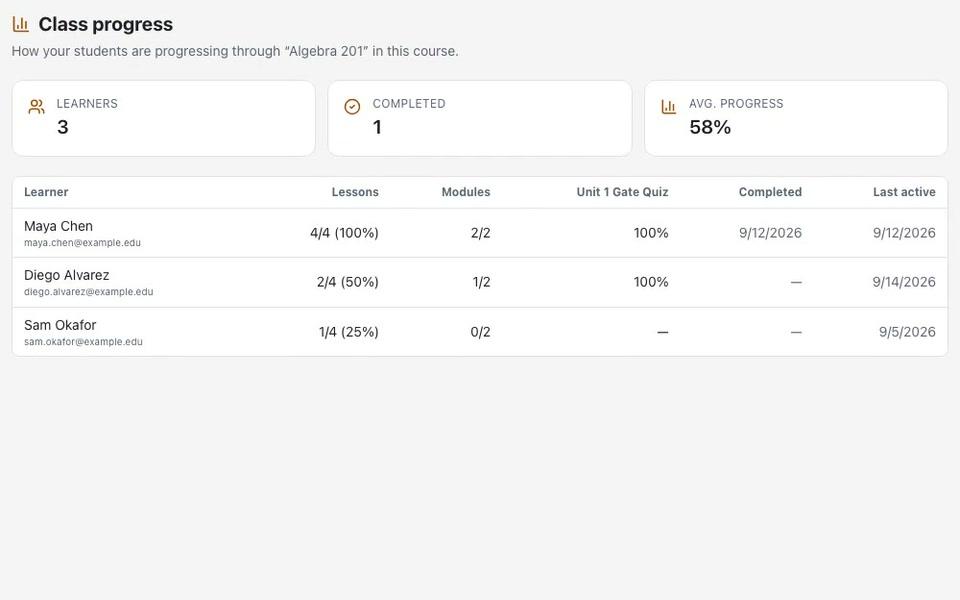
The instructor who teaches your course at an institution gets class progress for their section, and nothing beyond it. You see across institutions; they see their own class.
- Class Progress for their own section
- Module and quiz analytics, Outcome Progress and seven reports, including At-Risk Learners — all for their section
- At-risk email alerts, daily or weekly
5 · When you'd rather ask
Ask Cog about your published courses
Ask Cog in plain words instead of digging through tables. It reads your Studio analytics and answers. It never changes anything.
- Answers from Course Analytics, your learners, the institutions table and the Course Learners report
- Read-only: it looks, it never edits
Ask things like
Which cohort has the lowest completion?
Which institutions launched my course most recently?
Which learners haven't started yet?
What stays true
For you, as the course owner
Only the course owner opens the cross-institution view.
Section by section
Instructors see only their own section, never other sections or institutions.
No teacher personal data
You see institutions, sections and progress. Nothing about the teachers themselves.
Your data, in a file
Export learners to CSV from the Course Learners report, or save Course Analytics as a PDF.
Questions about Course Analytics
Who can see Course Analytics?
You, as the course owner. It covers every LMS that redeemed your course's access code. Instructors at each institution see only their own section.
What does an institution's instructor see?
Class Progress for the section they teach, plus module and quiz analytics, seven reports including At-Risk Learners and Tutor Questions, and Outcome Progress. All of it is scoped to their own section; they never see other sections or institutions.
Can I export the data?
Yes. The Course Learners report exports CSV, and you can print or save Course Analytics as a PDF. The learner table on Course Analytics is for browsing; use the Course Learners report when you need a file.
Can I see quiz results question by question across schools?
No. Across institutions you see the average quiz score and a five-band score histogram for in-lesson quizzes. Question-by-question analysis stays with each instructor, for their own section.
Do I see the teachers' personal details?
No. The institutions table shows the LMS, when it first redeemed your code, its last launch, sections and learners. No teacher personal data reaches you.
Publish once. See how it's doing everywhere.
Start free, publish your first course as an access code, and follow it into every institution that runs it.